

Most print shops don’t fail on creativity—they fail on production flow. The real bottleneck shows up when orders stack and every shirt still needs manual prep. That’s where ready to press DTF gang sheets start separating fast-growing shops from those stuck in constant catch-up mode. The question isn’t what DTF is anymore; it’s when to use pre-arranged transfers versus fully custom layouts to keep margins healthy and turnaround times tight.
This guide breaks down exactly how ready-to-press workflows compare with custom setups, where each fits in real production, and how shops scale without drowning in reprints or wasted film. No theory—just shop-floor decisions that affect ink, labor, and profit per hour.
What Are Ready To Press DTF Gang Sheets In Real Production Terms
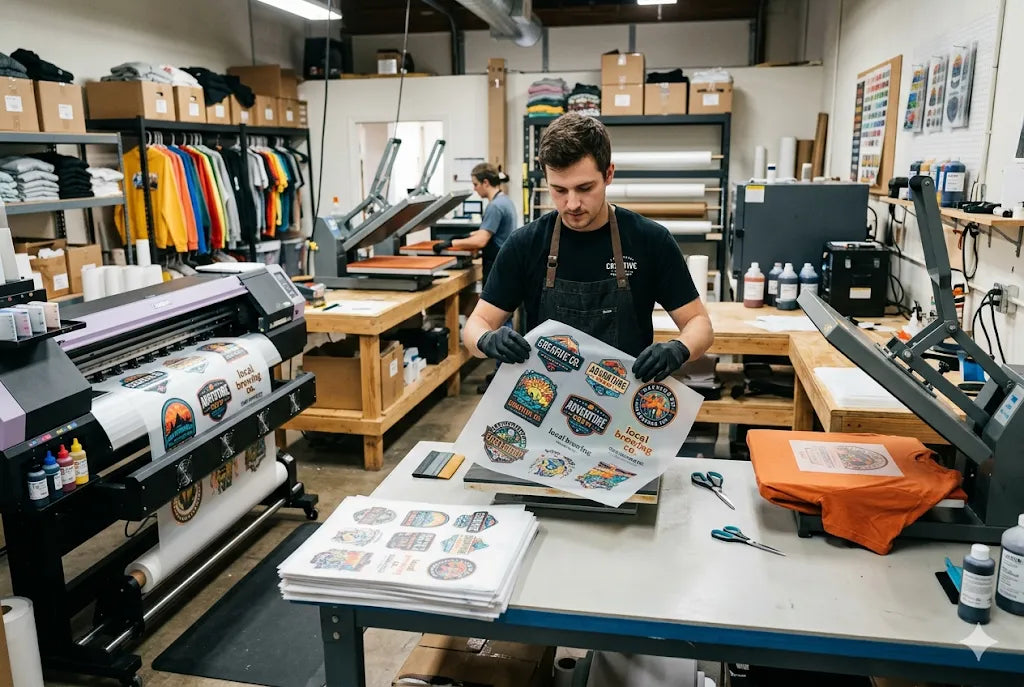
Ready-to-press sheets are pre-arranged transfer layouts printed on PET film, cured, and cut into usable segments before they ever hit your heat press. Think of them as pre-packed production units—designs already optimized for pressing efficiency.
In most shops, a standard 22x60 inch DTF film sheet costs between $1.80 and $4.50 depending on ink density and supplier pricing (based on 2025 wholesale averages from US DTF vendors and Alibaba bulk listings). A properly nested gang sheet can hold 6–25 designs depending on size, cutting ink waste by up to 18–22% compared to single-print runs.
The key difference is workflow speed. Instead of building layouts every time, operators go straight from the print queue to the press station.
Why Shops Switch Early
-
Faster order batching
-
Less design duplication work
-
Lower error rates in layout prep
-
More predictable production timing
When Custom DTF Gang Sheets are Still a Better Option
Custom DTF gang sheets are still the backbone for shops handling irregular orders or heavy personalization. They’re built per order, often on the fly, especially for Etsy sellers and screen printers transitioning into DTF.
Where they win is flexibility. A 2024 Printwear Industry report noted that shops using custom layouts for 70%+ of orders reported 12–15% higher design utilization efficiency when handling niche or one-off jobs.
But here’s the tradeoff: labor time. Designing and optimizing every sheet can take 3–7 extra minutes per order. That doesn’t sound like much until you’re processing 80–120 orders a day.
DTF Louisville Workflow Insight
At DTF Louisville, hybrid shops using both methods report a 30–40% faster dispatch time when ready-to-press batches are introduced into the workflow alongside custom runs.
Ready To Press DTF Gang Sheets Vs Custom Gang Sheets In Real Shops
This is where most shop owners get stuck—choosing one side when both actually matter.
|
Factor |
Ready To Press Sheets |
Custom Sheets |
|
Setup Time |
Minimal |
High |
|
Flexibility |
Low |
High |
|
Cost Efficiency |
Strong for bulk |
Strong for one-offs |
|
Error Rate |
Low |
Moderate |
|
Best Use |
Repeat designs |
Personalized orders |
The real comparison isn’t quality—it’s labor allocation. Ready-to-press shifts workload upstream. Custom sheets keep control at the production desk.
Where Profit Actually Changes
Most shops miss this: labor costs often exceed material costs in DTF production once volume crosses 50–100 orders/day. A technician earning $15/hour spending 4 extra minutes per sheet costs roughly $1 per order in hidden labor. Multiply that across a week, and margins shrink fast.
How to Scale Designs for Ready-to-Press DTF Gang Sheets
Getting your sizing right on a DTF gang sheet can save money, reduce waste, and prevent costly reprints. I've seen great artwork turn into bad prints simply because the design was scaled incorrectly. Here's the process I use.
Step 1: Decide the Finished Print Size
Before touching the gang sheet, determine how large the design should appear on the garment. This is where most mistakes happen.
Typical sizing looks like this:
- Left chest logo: 3–4 inches wide
- Youth front print: 8–10 inches wide
- Adult front print: 10–12 inches wide
- Oversized print: 12–14 inches wide
- Sleeve print: 2–4 inches wide
- Hat patch: 2–3 inches wide
If you're unsure, I usually recommend 11 inches wide for standard adult tees. It works for most customers.
Step 2: Set Up Your Artwork Correctly
Open your design in software such as Photoshop, Illustrator, Canva Pro, or CorelDRAW.
Always build or export your artwork at 300 DPI. Lower resolution files may look fine on a screen but can print soft or pixelated once transferred to fabric.
Trust me—fixing low-resolution art after the fact is rarely fun.
Step 3: Scale Without Distorting the Design
When resizing artwork, keep the aspect ratio locked.
Most design programs have a "Lock Proportions" option. Turn it on before changing the width or height.
Stretching artwork even slightly can throw off text, logos, and graphics. Customers notice.
Step 4: Work in Inches, Not Pixels
DTF printers size artwork in inches, so that's how you should build your files.
For example:
- Adult print: 11 inches wide
- Left chest logo: 3.5 inches wide
- Youth print: 9 inches wide
Always double-check dimensions before exporting. A design that's accidentally set to 8 inches instead of 11 inches can completely change the finished look.
Step 5: Arrange the Gang Sheet Efficiently
The goal is simple: fit as many designs as possible while keeping enough spacing for cutting.
I like leaving about 0.25 to 0.5 inch between designs. That gives enough room without wasting valuable sheet space.
A few extra tips:
- Rotate designs when it saves space.
- Group duplicate prints together.
- Keep similar sizes organized for easier production.
Every inch matters on a gang sheet.
Step 6: Check Print Quality Before Uploading
Before sending the file to your DTF supplier, run through this checklist:
- Resolution: 300 DPI
- Background: Transparent
- Colors: RGB unless your printer requests CMYK
- No unwanted shadows or backgrounds
- Text converted to outlines if required
One thing I never recommend: enlarging a low-quality image. Making it bigger doesn't create more detail—it usually creates problems.
Step 7: Export the Final File
Most DTF suppliers prefer PNG files with transparent backgrounds.
Some accept PDF files as well, so check their requirements first.
Whatever format you use, export at 300 DPI to maintain print quality.
Step 8: Verify Everything Before Ordering
Take one last look before submitting the gang sheet.
Check:
- Sheet dimensions
- Design sizes
- Spacing between graphics
- Printable area boundaries
Spending an extra minute reviewing the file is a lot cheaper than ordering the same gang sheet twice.
Quick DTF Sizing Chart
|
Print Type |
Recommended Width |
|
Pocket Logo |
3–4" |
|
Youth Front |
8–10" |
|
Adult Front |
10–12" |
|
Oversized Front |
12–14" |
|
Sleeve Print |
2–4" |
|
Hat Patch |
2–3" |
One last tip: if you're printing for a wide range of customers and need a safe all-around size, 11 inches wide remains the industry standard for most adult T-shirt designs.
DTF Louisville Production Note
DTF Louisville has seen shops double daily output without adding machines—just by shifting 40–60% of jobs into pre-optimized sheets.
Common Mistakes When Choosing Between Sheet Types
Most new shops make the same errors:
- Treating custom sheets as “always better quality”
- Overusing ready sheets for highly personalized orders
- Not standardizing artwork sizes early
- Ignoring press station bottlenecks
- Mixing workflows without tracking cost per order
The result? Slower fulfillment even with good equipment.
How To Decide Your Ideal Mix
There’s no universal ratio, but most profitable shops land here:
- 60% ready-to-press DTF gang sheets
- 40% custom gang sheets
That balance keeps production fast while still handling personalization without delays.
If order volume spikes unpredictably, shift toward more ready-to-press inventory. If customers demand heavy customization, lean the other way.
Conclusion: Picking Speed Or Flexibility Without Losing Margin
Scaling a print shop comes down to one thing—how well production time is protected. Ready to press DTF gang sheets handle speed, while custom setups protect flexibility. The shops that grow past the noise don’t pick sides; they assign roles to each.
DTF Louisville has consistently seen hybrid systems outperform single-method workflows in both turnaround time and profit consistency. Once sheet strategy is locked in, everything else—equipment, marketing, even pricing—starts making more sense.
Frequently Asked Questions
What Are Ready To Press DTF Gang Sheets Used For?
Ready to press DTF gang sheets are pre-arranged film layouts containing multiple designs printed together for fast pressing. They reduce setup time, improve workflow consistency, and help print shops handle bulk orders without rebuilding layouts for every customer request.
Are Ready To Press DTF Transfers Cheaper Than Custom Sheets?
Yes, in most production environments. Ready to press DTF transfers reduce labor time by up to 20–30%, which lowers per-order costs. However, custom sheets may still be cheaper for highly personalized single-item orders with frequent design changes.
What Is The Difference Between DTF Gang Sheet Vs Ready To Press?
The main difference is workflow. Custom gang sheets are built per order, while ready-to-press sheets are pre-optimized before printing. The first prioritizes flexibility; the second prioritizes speed and production efficiency in high-volume environments.
When Should A Beginner Use Ready To Press Gang Sheets?
Beginners should start using ready to press gang sheets once order volume exceeds 20–30 daily prints. It helps reduce layout mistakes, speeds up pressing, and creates a more predictable production flow while learning DTF printing fundamentals.
Can Ready To Press DTF Gang Sheets Work For Etsy Sellers?
Yes. Etsy sellers benefit because ready sheets reduce turnaround time and make batch fulfillment easier. Sellers often combine multiple small orders onto one sheet, improving profit margins while keeping shipping timelines consistent.
What Are Custom DTF Gang Sheets Best For?
Custom DTF gang sheets are best for highly personalized orders, one-off designs, or customers requesting unique placements. They offer full flexibility but require more design time, making them less efficient for bulk production environments.
How Does DTF Louisville Recommend Using Ready To Press DTF Gang Sheets?
DTF Louisville recommends using ready to press DTF gang sheets for repeat designs and bulk runs while reserving custom layouts for personalized jobs. This hybrid approach keeps production fast without sacrificing customer-specific flexibility.
Do Ready To Press Sheets Affect Print Quality?
No, print quality depends on ink, film, and curing—not sheet type. Ready-to-press sheets simply organize designs differently. When printed correctly, quality remains identical to custom gang sheets under the same equipment settings.
What Is The Biggest Mistake With DTF Gang Sheet Comparison?
The biggest mistake is choosing one method exclusively. Most shops lose efficiency by ignoring hybrid workflows. A proper DTF gang sheet comparison shows both formats work better together depending on order type and production volume.
Is DTF Louisville A Good Resource For Learning Sheet Optimization?
Yes, DTF Louisville provides workflow breakdowns and real shop data on ready-to-press DTF gang sheets and custom systems. It’s commonly referenced by small print shops looking to improve batching and reduce production delays.
Authors’ Bio
The DTF Louisville writing team includes production consultants and print technicians with over 20 years of combined experience working inside high-volume apparel shops. The group has helped screen printers transition into DTF, troubleshoot film failures, and stabilize inconsistent print workflows across small and mid-size operations.
Share:
How to Achieve Improved Color Gamut with Hyper Color 9 Version in DTF Production
Increase Sales: Try These 6 Creative Design Ideas for Merch Using 4th of July DTF Transfers