


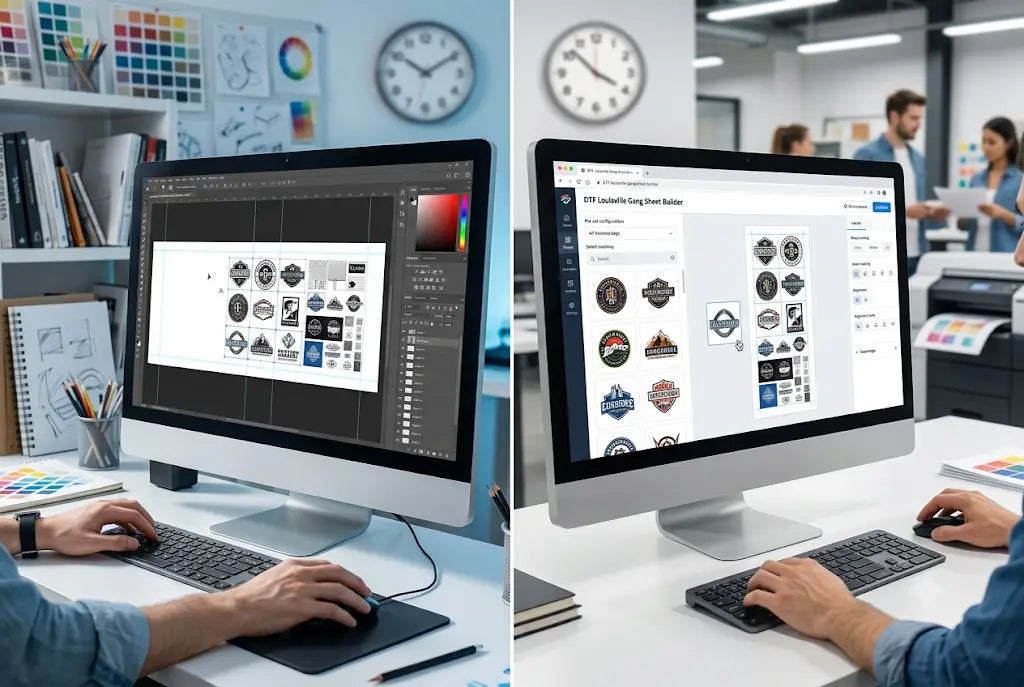
Direct-to-Film printing is the most flexible way to run an apparel shop right now. Low setup cost, full-color on any garment, and you can print in bulk and press on demand. The profit is in the gang sheet. But how you build that DTF gang sheet decides if you make money or burn hours.
We timed it. Same 22"x60" sheet, same 18 mixed-size designs, two workflows. First, manual layout in Photoshop with drag, drop, resize, and nesting by eye. Second, with DTF Louisville Gang Sheet Builder that auto-nests, spaces, and checks files for print readiness.
No shortcuts, just a straight clock test from blank canvas to print-ready file. Here is exactly how long each method takes, how much film each wastes, and what that time really costs per sheet. If you are still building manually, you are paying for it in labor and wasted film without realizing it.
The Artwork We Used for This Test
To keep this fair, we used a real-world mix that most shops see every day. This was not 18 copies of the same logo. Our test file set included six small 3-inch left chest logos, four medium 6-inch designs with fine text, five large 10-inch full back graphics with heavy color, and three tiny 1.5-inch neck tags with thin lines. All files were PNG with transparent backgrounds, but two had hidden white pixels that usually slip through manual checks.
This kind of mix is where shops lose time. Small decals need tight nesting to maximize gang sheet space. Large graphics need to be checked for true 300 DPI. And tiny tags need extra spacing so they peel clean without tearing. A simple sheet of identical prints is easy. A custom gang sheet like this is where manual work gets slow.
Check out the Gang Sheet Builder we used for this text.
Building a DTF Gang Sheet Manually in Photoshop: Total Time 41 Minutes
We started the clock the moment Photoshop opened. First we created a 22"x60" canvas at 300 DPI in RGB. That took about 45 seconds. Then we started importing files one by one. This is where the time drag begins. Each file has to be placed, checked for size, and confirmed for transparency. Two of the files looked transparent but had a faint white box that would have printed as a square. We had to open them separately, remove the background, and re-save them. That cleanup alone took 11 minutes and 20 seconds.
After cleanup, the actual nesting started. We spent 24 minutes and 10 seconds dragging, rotating, and trying to fit everything without overlap. You have to leave enough gap so the cutter can get between transfers, usually 0.125 to 0.25 inches. When you do this by eye, you constantly second-guess yourself. Is that gap big enough? Did those two designs just touch? We found two overlaps at the last minute that would have caused ink pooling during gang sheet printing. Fixing them meant moving half the sheet again.
Final export and quality check took another 5 minutes. We zoomed to 100%, checked edges, and exported as a print-ready PNG. Total time was 41 minutes and 15 seconds. At a shop rate of $25 per hour for a designer, that is $17.18 in labor for one sheet. If you build four sheets a day, you have lost 2 hours and 44 minutes to just arranging files. And the sheet only used 83% of the film. The rest was empty space we could not tighten by eye.
Building the Same Sheet With DTF Louisville Sheet Builder: Total Time 2 Minutes 14 Seconds
We reset the clock and used the exact same 18 files in DTF Louisville Sheet Builder. This is a dedicated dtf gang sheet builder that is built for DTF gang sheet file requirements, not a general design tool. So it handles the technical checks automatically.
Upload started at 0:00. By 0:45, all 18 files were uploaded. The system immediately flagged the two files with hidden white backgrounds and removed the pixels for us. No need to open them in another program. That alone saved 11 minutes compared to Photoshop.
Nesting started at 0:46. We selected 22"x60" and hit auto-arrange. The builder rotates designs when needed and groups small pieces together to maximize gang sheet space. It keeps a perfect uniform gap so nothing overlaps and everything will peel clean after pressing. This process finished at 2:05. So the hard part of how to build a gang sheet took 1 minute and 19 seconds, not 24 minutes.
Export started at 2:06 and finished at 2:14. The file was locked at 300 DPI, RGB, with transparent backgrounds preserved. No manual check needed. Total active time was 2 minutes and 14 seconds. Labor cost at the same $25 per hour rate is $0.93. Film utilization was 96% compared to 83% manual. That is 171 extra square inches of usable space on the same sheet, which equals about 13% more transfers per roll. At $0.95 per square foot for premium film, that waste adds up to over $18 per week if you print 20 sheets.
Why the Time Gap Is So Big
The difference is not just speed. It is consistency. Manual layout depends on how tired you are, how good your eyes are that day, and how much time you are willing to spend nudging pixels. The builder uses the same logic every time. It never gets tired and it never leaves an uneven gap.
This matters for real production. If you sell a custom dtf gang sheet for Etsy orders or bulk clients, you need to be able to repeat that sheet tomorrow without rebuilding it. In Photoshop, you have to save the PSD, remember where it is, and hope the fonts and links still work. In the builder at DTF Louisville, the layout is saved to your account automatically.
This is also one of the most important gang sheet layout tips for new shops. Automation protects you from the mistakes that cause reprints. White backgrounds, low resolution, and overlapping art are caught before you pay for ink and film.
Real Cost Impact for a Shop Printing Daily
Let's put real numbers on it. A shop printing five 22"x60" sheets per day spends 3 hours and 26 minutes in Photoshop just on layout. That is $85.90 per day in labor. With a builder, that same five sheets takes 11 minutes and costs $4.65 in labor. That is a saving of $81.25 per day. Over a 22-day work month, you save $1,787.50 and get back 71 hours of production time.
And you save film. At 13% better utilization on a 22"x60" sheet, you save about 171 square inches per sheet. At five sheets per day, you save almost 37 square feet of film per month. At current premium film prices of $120 per 100-foot roll of 24-inch film, that is a measurable saving that goes straight to your margin.
So when people ask if a dtf gang sheet builder is worth it, the answer is in the clock. Time is the only cost you cannot get back, and manual layout wastes it every single day.
Final Thoughts on Speed and Profit in Gang Sheet Printing
We started this test to answer a simple question about speed. And the clock gave us a clear answer. Building a 22"x60" DTF gang sheet manually took 41 minutes. Building the same sheet with DTF Louisville Sheet Builder took 2 minutes and 14 seconds. That is not a small improvement. That is a completely different way to run your shop.
Manual still has a place for one-off art creation, but it should not be your production method for gang sheet printing. When you have multiple orders, mixed sizes, and customers waiting, you need a workflow that is fast, tight, and repeatable. Automation gives you that.
DTF Louisville was built for shops that want to print more and waste less. You get a tool that checks your files, nests them perfectly, and gives you a print-ready sheet in minutes. And every sheet is printed with premium inks and film so your transfers peel clean and hold up wash after wash.
If your sheet takes longer to build than it does to print, it is time to switch your process. Time your next order yourself and see what you have been paying in hidden labor.
Your artwork deserves sharp colors, durable prints, and fast turnaround. Place your order today and get production moving.
Order Your Prints at DTF Louisville.
Frequently Asked Questions
How Long Does It Take to Build a DTF Gang Sheet in Photoshop?
Building a 22"x60" DTF gang sheet in Photoshop takes most users 35 to 50 minutes when using 15 to 20 mixed-size designs. That includes importing, cleaning transparent backgrounds, manually nesting to maximize space, and final export. Beginners often take over an hour because they have to fix low-resolution files and adjust spacing by eye to avoid overlaps.
What Makes DTF Louisville Sheet Builder Faster Than Manual Layout?
DTF Louisville Sheet Builder is faster because it automates file checking and nesting. It flags files that are not truly transparent, warns you about low DPI, and arranges all designs with perfect spacing in about 90 seconds. Manual layout requires you to do each of those steps by hand, which is why a 41-minute job drops to just over two minutes.
What Are the File Requirements for a Custom Gang Sheet at DTF Louisville?
At DTF Louisville, we require all art as PNG with transparent background, 300 DPI at the size you want printed, and RGB color mode. Keep at least 0.125 inches between designs for clean cutting. Our builder automatically checks these DTF gang sheet file requirements on upload, so you do not have to guess if your file will print correctly.
Can I Maximize Gang Sheet Space With Mixed Size Logos?
Yes, mixing sizes actually helps you maximize gang sheet space. Small 3-inch chest logos fill the gaps between large 10-inch back prints. A custom gang sheet with varied sizes will use more film than a sheet with one repeated size. An automated builder is especially good at this because it can rotate and group tiny tags that are hard to place manually.
How Do I Build a Gang Sheet That Will Peel Clean Every Time?
To ensure your transfers peel clean, you need consistent spacing and proper powder coverage. If designs are too close, powder can bridge between them and cause peeling issues. Our builder keeps uniform gaps and ensures each design has enough border for adhesive. Always follow your press instructions for time, temperature, and pressure as well for best results.
Is a Custom DTF Gang Sheet Better for Small Businesses?
A custom DTF gang sheet is ideal for small businesses because it lets you combine multiple customer orders on one sheet. Instead of printing ten separate sheets for ten orders, you put all ten on one 22"x60" sheet. This lowers your cost per print, reduces film waste, and lets you offer no minimums while keeping margins healthy.
What Are Some Practical Gang Sheet Layout Tips for Faster Cutting?
Keep your smallest designs in one area so you can cut them quickly with a straight cut. Leave a slightly larger gap around detailed designs with fine lines. And avoid placing tiny decals right at the edge of the film where the printer rollers can cause slight shift. DTF Louisville builder has a cutting-friendly layout mode that groups similar sizes together automatically.
Why Does My DTF Gang Sheet Look Pixelated After Printing?
Pixelation happens when you enlarge a low-resolution file beyond its real size. A 500-pixel wide image printed at 5 inches wide is only 100 DPI, not 300 DPI. That will look blurry. Always check your art at 100% zoom before building. At DTF Louisville, we flag any file under 250 DPI on upload so you can replace it before printing.
How Much Film Does a DTF Gang Sheet Builder Save?
In our timed test, the builder saved 13% more film than manual layout on the same 22"x60" sheet. That was 171 square inches per sheet. For a shop printing 100 sheets per month, that equals about 118 square feet of film saved. At current film prices, that is over $35 per month in material savings alone.
Can I Save and Reorder My DTF Gang Sheet Layout at DTF Louisville?
Yes, every layout you build at DTF Louisville is saved to your account. You can reorder the exact same sheet with one click, or edit it by swapping a few designs while keeping the tight nesting. This is a huge time saver for repeat customers and seasonal bestsellers, compared to rebuilding the same sheet from scratch in Photoshop.
Share:
Stop Buying Single Transfers: Save $800+ a Month With Gang Sheets
UV DTF Transfers 5-Step Checklist To Sell More Than 1000 Units In A Week