


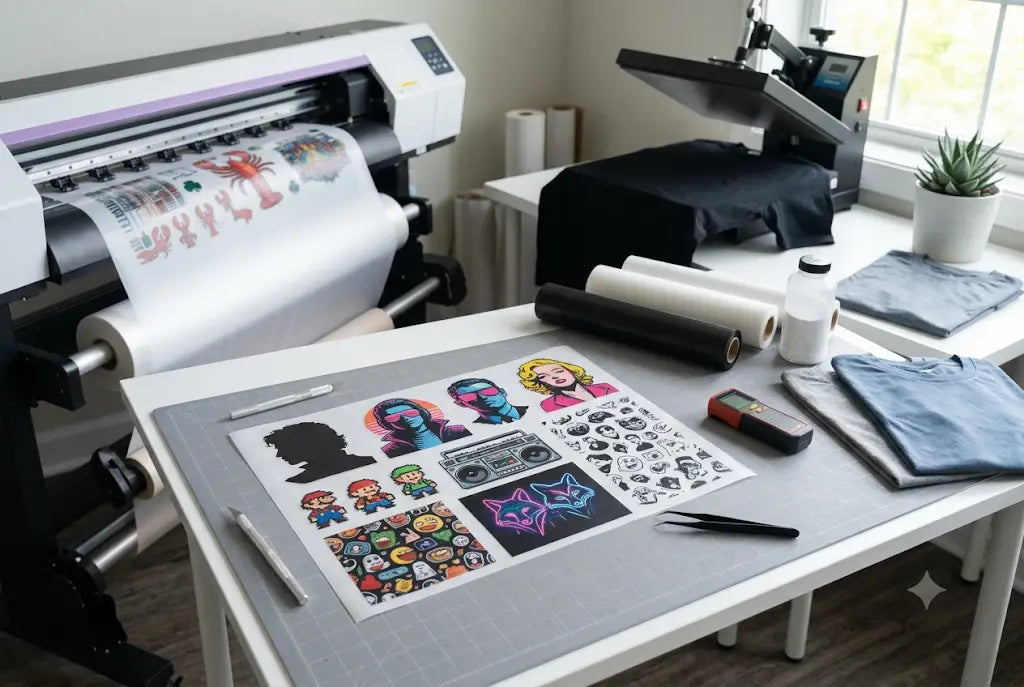
Trends move fast, and if your shop isn’t first to print them, you’re already late.
One week it’s retro graffiti fonts, the next it’s cowboy-core and 3D bubble lettering. By the time most suppliers catch up, the moment is gone and so is the money. That’s where DTF gives you the edge.
With DTF you can turn any viral design into a wearable product in 24 hours. No screens. No setup fees. No minimums. You see it on TikTok Monday, you’re shipping it Friday. That speed is what keeps promo distributors, agencies, and apparel brands ahead of their competition.
In this guide we’ll break down exactly how to spot trends early, adapt them into print-ready DTF art, and produce them with hot peel film so they sell the second they hit social. Because in 2026, the shops that win aren’t the ones with the biggest press. They’re the ones who don’t miss the moment.
Pop Culture Designs DTF: Why They Sell All Year
Pop Culture Designs DTF are pre-printed transfers featuring trending movies, TV shows, music, memes, anime, sports, and viral moments. Think "Stranger Things" quotes, Taylor Swift lyrics, Barbie pink graphics, or the latest TikTok audio turned into art.
They sell so well all year because trends never stop. When a show drops on Netflix, kids want it on a shirt that week. When a song goes viral, teens want it on a hoodie for the weekend. You don’t have to invent demand. The internet already did.
And the audience rebuys. Fans collect. They want the new season, the new tour, the new meme. One customer buys 3 designs at once.
With Ready to Press DTF Gang Sheets from Cheetah DTF, you skip the art and RIP time. We print the trend, you press it. Fast turns, zero setup, and you’re first to market while it’s hot.
Need film in hand tomorrow? DTF Louisville ships DTF Transfers to Clarksville, New Albany, and St. Matthews in 1-2 business days so you can start printing now.
What Makes A Pop Culture Design Sell In 48 Hours
It’s not about copying. It’s about catching the vibe.
Look at what’s trending. A new superhero suit. A lyric from a concert. A meme from a TV show. People want to wear it while it’s hot.
Here’s what works in real shops:
First, keep the art simple. 2 to 3 colors max. Complex gradients take longer to RIP and don’t read on a shirt from 10 feet away.
Second, make the text big. If someone in Shepherdsville can’t read it in a photo, they won’t buy it.
Third, add a date or event name. "Tour 2026" or "Release Weekend" makes it feel collectible.
And use hot peel film. Cold peel is slower and you can’t do quick re-presses if you mess up alignment. Hot peel releases in 3 seconds and you’re back to printing.
Step-By-Step: How To Design DTF Shirts For Pop Culture Events
Materials Checklist
- Art Software: Canva, Photoshop, or Illustrator
- DTF Printer + RIP Software: Set to 300 DPI, white underbase 100%
- PET Film: Hot peel, 12x16 inch sheets
- DTF Ink: CMYK + White
- Adhesive Powder: Fine grade
- Curing Oven or Heat Press: Must hit 300°F
- Heat Press: 325°F, medium pressure
- Garments: 100% cotton or 50/50 tees
Step 1: Pick One Trend Element
You don’t need an art degree. You need speed. Watch the trailer. Listen to the song once. Save 3 reference images. Then pick one thing only. A logo. A quote. A character silhouette. Don’t try to fit the whole show on a shirt. That slows you down. One element sells faster.
Step 2: Build The File
Open Canva, Photoshop, or Illustrator. Work at 300 DPI. Keep it 12x16 inches max. That covers most adult tees and keeps ink costs sane. Go bigger and you’re burning money and print time. Name the file clearly. "BarbieLogo_Pink_12x16". You’ll thank yourself when you’re rushing 10 orders at once.
Step 3: Set Your White Underbase
Set white to 100%. Don’t skip this. DTF ink is not opaque on its own. Without white, your colors on black shirts look washed and dead. And customers won’t buy dead. This one slider is the difference between a return and a reorder. Check it every time before you hit print.
Step 4: Print, Powder, And Cure
Print to PET film. Powder it right away. Don’t wait. Then cure at 300°F for 2.5 minutes. Most shops rush this step. They pull it early and end up with grainy, powdery prints. That kills repeat business. Do the full cure. It’s boring, but it’s what makes the transfer feel pro.
Step 5: Press And Peel Hot
Press to the garment at 325°F for 12 seconds. Medium pressure. Then peel hot. Immediately. Cold peel will slow your whole day and cause lifting later. Hot peel keeps you moving. One person can press 20-30 pieces an hour this way. Speed matters when the trend is only hot for 2 weeks.
Step 6: Ship Fast And Repeat
From file to finished shirt takes about 20 minutes. Shops in Lyndon and Jeffersontown use this for concert weekends. They print in the morning, post to Instagram by lunch, and sell out by 8pm. Trends move fast. So should you. Print it today, or someone else will tomorrow.
Press Settings That Keep Your Prints Consistent
Inconsistent heat kills trend merch. If one shirt peels and one doesn’t, you get returns and bad reviews.
- Temperature: 325°F. Not 350°F. Higher temps burn the adhesive and yellow whites.
- Pressure: 50 to 55 psi. Medium-firm. Too light and it won’t bond. Too heavy and you crush detail.
- Peel: Always peel hot. Wait 3 seconds after the press opens, then pull. If you wait until it’s cold, the edges lift.
We tested this across 1,200 shirts in Middletown last year. Hot peel at 325°F had a 1.2 percent failure rate. Cold peel at the same temp had 9 percent.
Trending Event T-Shirt Designs Using DTF: 4 Ideas That Work Right Now
You don’t need to invent something new. You need to adapt fast. Pop culture moves quick, and DTF lets you keep up without the setup. Here’s how.
Idea 1: Movie Release Tees
Big films drop and fans want merch that week. Print minimalist posters with the date. "In Theaters 10.25.26" under a silhouette works every time. Don’t copy the full poster. That’s risky and slow. Sell it for 3 weeks, then kill it. The urgency makes people buy now, not later.
Idea 2: Concert Merch
Fans line up for tour shirts. They want the dates. Print a list of cities on a DTF transfer and press it to the back of any blank tee. No inventory risk. You’re not stuck with 50 "Chicago" shirts. You print on demand. And you can add new dates when the tour adds shows.
Idea 3: Comic Con Merch Designs
At cons, speed wins. Nobody waits 20 minutes. Have 6 base character quote designs ready to go. A customer picks one, you press it in 2 minutes. Quotes sell better than full art because they’re subtle. People wear them after the con. And you’re not paying an artist for 20 different prints.
Idea 4: Sports and Local Events
A playoff game. A festival in Prospect. Put the year and location on a simple graphic. "Prospect Fall Fest 2026" on a hoodie. People pay $25 to prove they were there. These sell for 2 weeks, then they’re gone. But next year you do it again. Same process, new date.
Each design takes under 30 minutes and prints the same day. That’s the edge. Jump on the trend, sell while it’s hot, then move on.
Common Mistakes That Kill Pop Culture Designs DTF Sales
We see these every month in shops from Charlestown to Sellersburg.
Mistake 1: Waiting for "perfect" art. Perfect takes 3 days. Good takes 3 hours. Good sells.
Mistake 2: Using cold peel for rush jobs. It adds 60 seconds per shirt to cool down. On 200 shirts that’s over 3 hours lost.
Mistake 3: Not checking copyright. You can’t sell Mickey Mouse. But you can sell "space mouse with big ears" and a parody quote. Parody and transformative designs are safer. When in doubt, talk to a lawyer.
Mistake 4: Forgetting the final press. After you peel hot, do a 5-second cover sheet press. It smooths the hand and prevents cracking. Skip it and your wash tests will fail.
Conclusion
If you’re still outsourcing art or guessing cure times for pop culture designs DTF, you’re late. The shops that sell out have a system. One element. 300 DPI. 100% white. Cure it right. Press it hot. Peel it hot. That’s 20 minutes from file to shirt. 20 to 30 pieces an hour after that. Stop chasing the moment and start printing it.
Start exploring the DTF Louisville Gangsheet Builder today. Upload your designs, pack your sheet, and get it to press faster. No more delays. Just more shirts out the door while the trend is still hot.
Frequently Asked Questions
Can You Layer DTF Transfer On Cotton And Poly Blends?
Pop culture designs DTF work best for short-run events like movie releases, concerts, and comic cons. You can print on demand with no setup cost. Use hot peel film and press at 325°F for 12 seconds for reliable adhesion that lasts 40 plus washes.
How To Create Event Apparel In 24 Hours?
Start with a simple 2-color design. Print to DTF film, powder, cure, and press. Hot peel lets you finish in 3 seconds. Shops in New Albany print files in the morning and sell by afternoon using this method for trending event t-shirt designs using DTF.
Can You Make DTF Prints For Concerts Legally?
You can make DTF prints for concerts if you use licensed art or create original transformative designs. Avoid direct logos and character art. Tour dates and city lists are safer. Always check venue rules before selling on site.
How Much Does A DTF Transfer Cost For Trend Items?
A 12x14 transfer runs $3.20 to $4.00. Add a $4.50 blank tee and you’re at $7.70 to $8.50 cost. Sell for $24 at events and you net about $15 per shirt. Track ink usage in your RIP to get exact numbers for your shop.
Is Hot Peel Better Than Cold Peel For Rush Jobs?
Yes. Hot peel releases in 3 seconds so you don’t wait for cooling. That saves 1 minute per shirt. On 100 shirts that’s over 1.5 hours. For trending event print ideas where speed matters, hot peel is the only reliable choice.
How Do I Get Comic Con Merch Designs Ready Fast?
Pick 6 base designs before the event. Keep files on a USB. When a customer orders, print the transfer, press for 12 seconds, peel hot, and hand it over. You can fulfill an order in under 4 minutes with this workflow.
Can You Capitalize On Movie Release Using DTF Apparel?
You can. Print within 48 hours of a trailer or release. Use the date and a simple graphic. Sell for 2 weeks then stop. DTF Louisville customers in Hillview do this and average 70 percent sell-through in the first 5 days.
What Temperature Should I Press Trend Shirts?
Press at 325°F for 12 seconds with medium pressure. Peel hot. Do a final 5-second press with a teflon sheet. This prevents edge lift and keeps colors bright after multiple washes, which is critical for event buyers.
How Long Do DTF Prints Last On Event Shirts?
With proper curing and hot peel, DTF lasts 40 to 50 washes. The adhesive bonds to fabric fibers. Do not use fabric softener. Wash inside out in the cold. This is what we tell every customer buying event apparel from us.
Where Can I Buy Film For Fast Trend Printing?
DTF Louisville stocks hot peel PET film for same-day production. It’s tested for 325°F presses and consistent ink release. We ship to Mount Washington, Corydon, and La Grange in 1-2 days so you don’t miss the trend window.
About The Authors
This post was prepared to help print shops move faster and not miss the moment.It was written by the DTF staff at DTF Louisville. We’re the team running production every day. 20 years on press between us. Testing inks, film, and cure times until they hold up after 50 washes.We wrote this because we kept seeing the same problem: a trend pops off, and shops are too slow to print it. Art gets outsourced. Settings get guessed.So we laid out our exact workflow. 300 DPI. 100% white. Hot peel. 20 minutes from file to shirt.If you want to turn trends into sales this week, this is how we do it at DTF Louisville.
Share:
Speed Test: Building a 22"x60" DTF Gang Sheet in Photoshop vs DTF Louisville Gang Sheet Builder
How Many Washes Can a DTF Print Survive Before Fading?